A new online exhibit, called Places of Invention: Science and Mathematics at St. Paul’s School, is now part of the Ohrstrom Library website. This online exhibit is based on a more in-depth Archives photograph exhibit now on display in the upper level of Ohrstrom Library. Here is an excerpt from the introduction to the online exhibit:
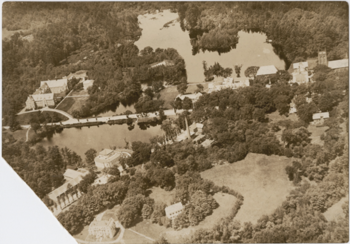
With construction of the Lindsay Center for Mathematics and Science now well underway, it is fitting that the St. Paul’s School community reflects back upon the places that have served the study of science and mathematics so well throughout the School’s history.
Photos from the Archives were scanned specifically for the online exhibit including this image of a Biology classroom in the Westinghouse Lab:
The online exhibit features images ranging from the first science lab built on the St. Paul’s School grounds in 1889 to the architectural renderings of the Lindsay Center for Mathematics and Science, now under construction. The main gallery of thumbnail images includes links to individual pages that feature larger images and brief descriptions. There is also a slideshow of the images that can be initiated from any of the pages in the exhibit.
Take a few moments to browse through the gallery of images and follow the development of the places that have helped to facilitate the high standard of education in mathematics and science that has been a part of the St. Paul’s School vision from its very beginning.
Springer Handbook of Robotics edited by Bruno Siciliano and Oussama Khatib, Springer, 2008.
Find it in Ohrstrom at: REF 629.892 Si1S
A scientific guide to the principles and methods of designing and controlling robots. This ‘handbook’ is more like an encyclopedia, serving as a comprehensive guide to the fascinating field of robotics.
Read about:
• Robot Structures
• Sensing and Perception
• Mobile and Distributed Robotics
• Field and Service Robotics
• Human-centered and Life-Like Robotics
The World Digital Library is a partnership between UNESCO and the U.S. Library of Congress. The site aims to provide free access to digitized treasures currently housed in libraries, museums & other institutions around the world.
Search by keyword or browse using different methods including: place, time or topic.
Europeana is collaboration between dozens of European institutions including: museums, libraries, archives and galleries. Currently housing 4 million items, the project aims to have 10 million items online in 2010.
Search for James Bond, Descartes, hippos or Alice in Wonderland. Searches may be further narrowed by item type including: texts, images, videos and sounds.
Helpful for: Humanities III, Humanities IV, Humanities V, Religious Studies, Art, Science, books, Primary Sources
A new book display in the Baker Reading Room brings together over a dozen books from the Ohrstrom Library collection that share a common thread: They all have “The Physics of” as part of their titles. Beyond that connection it is a very diverse selection, covering topics that range from sports, music and sailing, to NASCAR, Star Trek, Superheros, and even James Bond movies.
Did you know that:
A baseball compresses from a round shape to an elliptical one when the bat-ball impact approaches 140 MPH?
When a hockey puck is tilted at a positive angle relative to the ice there is a lift force directed upward?
The idea behind the deflector shield on the Enterprise originated with the concept of a coherent gravitational field that creates a curvature of space?
Spiderman swinging on his web from building to building is a good illustration for the principle of conservation of energy?
Having the ideal tire slip angle on a NASCAR race car can mean the difference between spinning off the race track or speeding across the finish line?
The first watch camera was made in 1886, but James Bond’s ring camera worn in the film A View to a Kill is too small to actually function?
Come check out one of these interesting titles and find out some of the different ways that physics functions in your day-to-day world.
The New Year brings a new first for some SPS students: FIRST Robotics. This will be the fifth year that the SPS team will compete in the Granite State Regional division of the national FIRST Robotics competition. Last year’s team finished 3rd out of 48 individual teams, and took second place in the three-team alliance portion of the competition (read a full article about last year’s competition on the SPS website HERE).
Team leader Terry Wardrop has this to say about the competition:
“The St. Paul’s School Metal Vidsters FIRST Robotics team has just started the 2009 competition. This year it is called Lunacy and involves creating a robot to solve a problem in an environment approximating that of the moon. They have done this by creating a low-friction playing surface – we need to create a robot that can shoot a mini-basketball at a moving target while driving on a surface that is as slippery as ice!”
This year’s competition brings a new set of challenges for the team. Each competing team receives a kit of parts and rules to the game their robot will compete in. It’s up to the individual teams to design the most efficient robot to succeed in the game arena. Take a look at this nifty clay animation video of the game rules for the 2009 competition:
Ohrstrom Library has a strong collection of books on robotics, including FIRST Robots: Rack ‘n Roll (629.892 W64). This book features profiles of 30 award-winning robot designs from the 2007 FIRST Robotics competition, and is itself a tribute to great design with a hidden magnetic closure and a mirror-like metallic finish on the page edges. Other books on robotics can be found on the shelf in the upper stacks, reference, and the DVD collection at 629.892.
Best of luck to the SPS Robotics team over the next few weeks as they build their robot for the upcoming competition.